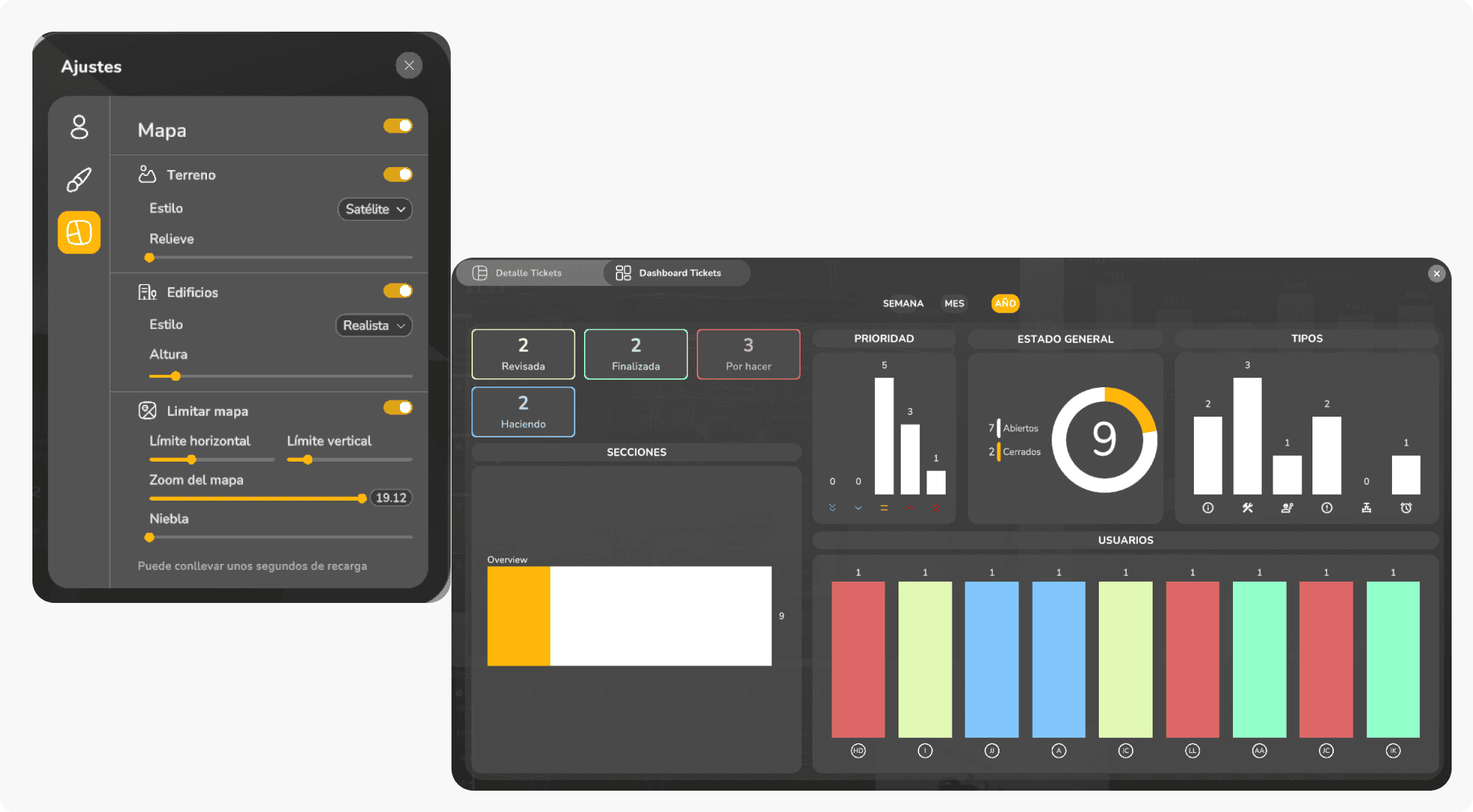
Nueva vista del dashboard de incidencias
Un rediseño que organiza la información de forma más clara, accesible y coherente con la estructura global de TOKII.
Incluye:
Agrupación visual mejorada
Priorización de estados y responsables
Mayor legibilidad en entornos con gran volumen de incidencias
Un paso adelante en eficiencia operativa.
Settings del mapa: nuevos tiles y control de zoom
El módulo incorpora:
Compatibilidad con nuevos proveedores de tiles
Configuración avanzada de niveles de zoom
Mayor flexibilidad para proyectos con cartografía personalizada
Mejora clave para despliegues en entornos industriales y urbanos.
Actualización de Unity
La plataforma se actualiza a una versión más reciente de Unity, aportando:
Mejor rendimiento general
Corrección de bugs del motor
Estabilidad en renderizado 3D y UI
Una base técnica más sólida para las versiones venideras.
Revisión del sistema Mapbox
Mapbox recibe una auditoría completa:
Validación de claves
Optimización de cargas
Reducción de latencias al navegar
Resultado: mapas más ligeros, más rápidos y más estables.
Mostrar el histórico favorito
Se habilita la capacidad de recordar y mostrar un histórico favorito, mejorando la analítica recurrente y dando acceso inmediato a la vista más consultada.
Nuevo módulo de gamificación
El sistema de gamificación empieza a consolidarse como un nuevo pilar dentro del ecosistema TOKII. Esta versión introduce las primeras pantallas y flujos que darán forma a un futuro módulo completo de misiones, retos y progresión de usuario.
Pantalla unificada para iniciar retos
Se desarrolla una nueva pantalla diseñada para:
Equipos operativos
Dinámicas de gamificación interna
Seguimiento estructurado de actividades por usuario
Esta interfaz centraliza el inicio y la comprensión del reto, facilitando la experiencia tanto para usuarios puntuales como para equipos coordinados.
Estructura inicial del sistema de misiones y progreso
Se sientan las bases del flujo completo de retos mediante:
Vista general del reto: descripción, estado y objetivos.
Lista de tareas: todas las actividades que componen el reto, organizadas y accesibles.
Vista individual de tarea: detalle, progreso, requisitos y resultados.
Un primer paso sólido hacia un sistema de gamificación más profundo, consistente y ampliable.
Tickets: consolidación del dashboard y claridad operativa
Esta actualización refuerza las capacidades analíticas y operativas del módulo de tickets, con especial atención en KPIs, organización, filtros y permisos. El objetivo: dar a los equipos una visión más clara, más fiable y más rica en contexto.
Dashboard Tickets: nuevas capacidades en KPIs y secciones
El dashboard continúa evolucionando con mejoras en:
Nuevas secciones que reorganizan la información de manera más lógica.
Reestructuración por prioridad, estado y asignación, facilitando la lectura operativa.
KPIs refinados para entender actividad, carga de trabajo y rendimiento del equipo.
Mejoras estéticas y de lectura en gráficas
Se aplican ajustes visuales orientados a la claridad inmediata:
Colores coherentes con la paleta global
Bordes y delimitaciones más nítidas
Distribución más equilibrada
Tooltips refinados para una interpretación más precisa
Un conjunto de mejoras que elevan la calidad visual del panel sin alterar su arquitectura.
Filtros por semana/mes/año
Se introduce una navegación temporal inteligente, permitiendo:
Analizar tendencias
Comparar periodos
Comprender la evolución del flujo de trabajo
Revisión del sistema de permisos
Se corrigen inconsistencias relacionadas con:
Lectura de roles
Acceso a secciones del dashboard
Comportamientos de edición/visualización
Ahora los permisos se comportan de manera más coherente, segura y predecible.
Eliminación del reseteo automático de filtros
Se retira el reinicio automático de filtros para permitir configuraciones personalizadas, manteniendo el contexto y el criterio de análisis del usuario.
Carga de paleta favorita desde backend
La paleta de colores definida por cliente se carga de forma automática y consistente en:
KPIs
Mapas
Tablas
Gráficos de tickets
Unificación estética completa del ecosistema visual.
Correcciones de errores
Buscador del mapa TOKII
El buscador del mapa, pieza clave para la navegación en entornos densos, experimentaba comportamientos inconsistentes al introducir texto o aplicar filtros.
En esta versión se corrige:
Bloqueos momentáneos en la entrada de texto
Pérdida de foco tras buscar
Inestabilidad al interactuar con marcadores filtrados
El resultado es un flujo fluido, estable y sin interrupciones visuales.
Leyenda del Donut por MQTT
Se detectaba que el Donut Chart solo mostraba el último dato recibido, ignorando el resto del dataset.
Ahora:
Se procesan todos los valores emitidos por MQTT
La leyenda se actualiza correctamente
Se restablece la lectura íntegra del conjunto de datos
Un arreglo clave para garantizar transparencia analítica.
Pequeños bugs del detalle de dashboard
Incluye correcciones en:
Alineación de KPIs
Comportamientos de hover y tooltips
Sincronización de filtros internos
Actualización de secciones tras recargas parciales
Pequeños ajustes, gran impacto en la consistencia visual de los paneles.
NullReferenceException
Se soluciona una excepción crítica que podía interrumpir la interacción en dashboard e históricos.
Este fix incrementa la estabilidad general, especialmente en sesiones prolongadas.
Hotfix de tickets geoposicionados
Se ajusta la lectura de latitud y longitud, corrigiendo:
Posicionamientos erróneos
Desplazamientos inesperados en el mapa
Problemas al abrir detalle desde un ticket georreferenciado
Los tickets vuelven a situarse exactamente donde deben.